


Employee Experience With Technology: Why You Should Personalize Internal Tools

Think about how you get things done outside of work. Your banking app shows what matters, streaming suggests the next episode, and the online store remembers your preferences. Everything feels tailored to you. Now switch settings: you reach the office and find a system that treats everyone the same, asks for repeated data, and hides exactly what your role needs. That contrast sits at the center of employee experience with technology and it quietly shapes how well your teams work.
People don't drop that expectation when they clock in. They start to expect the same clarity from work tools that they find on their phones. When they don't get it, employee experience with technology stops supporting work and starts getting in the way.
The numbers back up the trend, and it isn't fading. Back in 2021, McKinsey showed that 71% of consumers expected personalized interactions and that 76% felt frustrated without them. Since then, the bar has only risen: Salesforce reported 73% in 2024. In other words, personalization is no longer a differentiator, it's the standard. So here's the question: if this holds true for buyers, why do we still deliver generic experiences to the people who do the work?
Employee experience with technology follows people through the workday
This higher bar doesn't stay at the front desk. Instead, it shows up in the small details of daily work. That's why employee experience with technology comes down to very concrete things:
- how easily people find information;
- how many steps a task takes;
- how clear the dashboards are;
- how well systems talk to each other;
- how relevant alerts and indicators are.
When these elements fail, the effect shows up fast. And it rarely stays within a single team.
When generic systems slow the operation down
Systems built for "everyone" often serve no one well. A few examples are easy to recognize:
- dashboards with metrics that don't help that specific role;
- forms that ask for data already stored in another system;
- the same alerts for everyone, regardless of responsibility;
- important information scattered across several platforms;
- tools that work at the desk but get in the way out in the field.
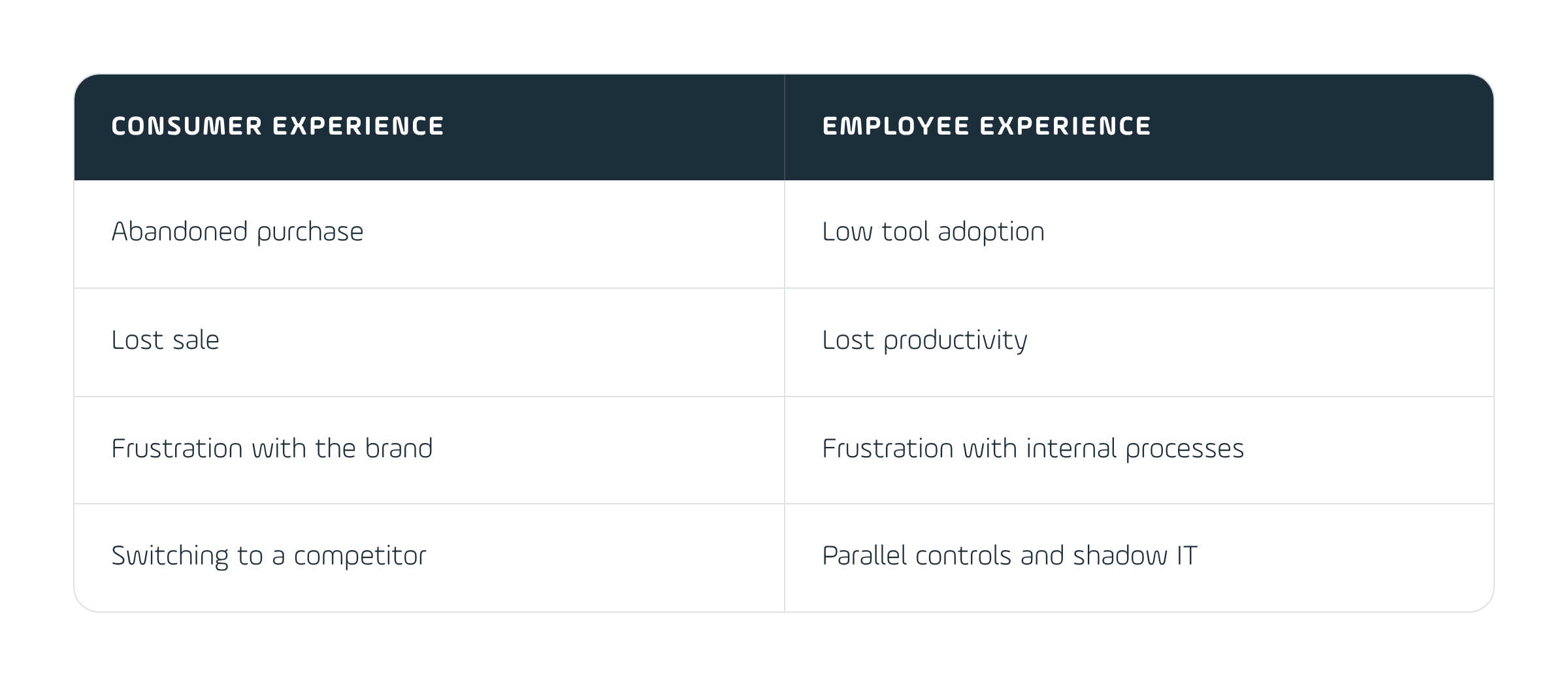
The result is predictable: wasted time, rework, errors, and more support tickets. On top of that, employees build workarounds: spreadsheets, chat messages, and the familiar shadow IT. The consumer analogy makes the cost clearer:
What personalizing internal tools really means
Personalization isn't about building a different system for each person. It means delivering interfaces, information, permissions, and flows that fit the context of each role.
A manager, an analyst, and a field professional can use the same solution. However, they don't need to see the same indicators or follow the same journey. In practice, this means dashboards by role, flows based on responsibility, permissions by profile, relevant alerts, and automation of repetitive tasks.
Read also: How AI Hyperpersonalization Is Transforming User Experience
The tool should follow the work, not the other way around
Off-the-shelf solutions solve many scenarios. Yet when they force the operation to bend too much around the technology, custom development starts to make sense. The goal isn't to "build everything from scratch." Rather, it's to understand which problem needs solving, who actually uses the solution, and in what context.
This care pays off in measurable ways. In a logistics project, for example, by designing the system around the routine of the people who use it, Mouts IT cut checkout time by 73% and operational discrepancies by 85%. In short, when technology respects the context of use, the gains show up in numbers.
Read also: Digital Transformation: Why Does Your Company Need It Now
Product squads: why continuous evolution matters
Employee experience with technology doesn't end at launch. Routines change, new integrations appear, and needs evolve over time. That's why multidisciplinary squads make a difference. By bringing together development, UX, data, and business insight, these teams validate real needs, prioritize features, and deliver improvements in cycles. As a result, the tool evolves based on evidence, not guesswork.
Read also:
How to assess your internal tools
Before investing, run an honest diagnosis. A few questions help you start:
- How long do employees take on recurring tasks?
- How much data has to be entered more than once?
- Which workarounds have appeared outside the official systems?
- Do the dashboards help each profile make decisions?
Metrics such as execution time, volume of rework, adoption rate, and number of tickets make the picture sharper. Keep one limit in mind, though: a well-tuned tool improves productivity, but it won't fix engagement or turnover on its own.
Conclusion
Personalization shouldn't be a concern only for the teams that serve consumers. Applied to internal tools, it turns technology into a real ally for productivity and decision-making.
Does your team work better with its current tools, or has it learned to work around their limits? Talk to Mouts IT and find out how to build a digital experience that fits your operation.

Related news
Innovation, the global market and divers topics about the technology universe are currently available on our blog.
 Cases
Big Data in energy: how to manage data in the energy sector?
The energy sector is one of the fundamental pillars of the global economy, driving everything from large industries to domestic consumption. With the advancement of digital technologies, the amount of data generated in this sector has increased exponentially, making Big Data an essential tool for companies seeking to stand out in a competitive market. But how to collect and analyze this data effectively? And what are the benefits of a well-done analysis?
 Cases
Energy and sustainability: 3 innovative technologies in the energy sector
Sustainability has become a central issue in the energy sector, driven by the need to reduce environmental impact, ensure energy security and meet growing demands for cleaner energy sources. With increasing pressure to reduce carbon emissions and adopt more sustainable practices, the sector faces significant challenges, but also promising opportunities.
 Cases
Why is cloud migration important for the energy sector?
Energy market professionals can already see that the sector is undergoing a significant transformation, driven by the need for greater efficiency, sustainability, and innovation. Amid these changes, cloud migration has stood out as one of the main strategies for companies looking to optimize their operations, reduce costs and improve collaboration.